这篇文章主要介绍了在Ubuntu系统中安装MariaDB数据库的教程,同时也适用于其他Debian系的Linux系统,需要的朋友可以参考下
MariaDB是一个开源数据库且100%与MySQL兼容,目标是替代MySQL数据库。
MariaDB的背景 :
2008年,MySQL被后来被Oracle在2010年收购的Sun Microsystems收购了。 最初被Sun公司的收购由于符合项目的需要而受到MySQL社区的欢呼,但是这种情绪并没有持续太久,接下来被Oracle的收购,不幸期望远远低于预期。许多MySql的开发者离开了Sun和Oracle公司开始新的项目。在他们中间就有MySQL的创建者以及项目长期技术带头人之一的Michael ‘Monty' Widenius。Monty和他的团队创建了MySQL的一个fork版本并且命名它为MariaDB。
本篇我们会讨论如何在Ubuntu上安装MariaDB。默认上MariaDB的包并没有在Ubuntu仓库中。要安装MariaDB,我们首先要设置MariaDB仓库。
设置 MariaDB 仓库
  $ sudo apt-get install software-properties-common
  $ sudo apt-key adv --recv-keys --keyserver hkp://keyserver.ubuntu.com:80 0xcbcb082a1bb943db
  $ sudo add-apt-repository 'deb http://sfo1.mirrors.digitalocean.com/mariadb/repo/10.0/ubuntu trusty main'
安装 MariaDB :
  $ sudo apt-get update
  $ sudo apt-get install mariadb-server
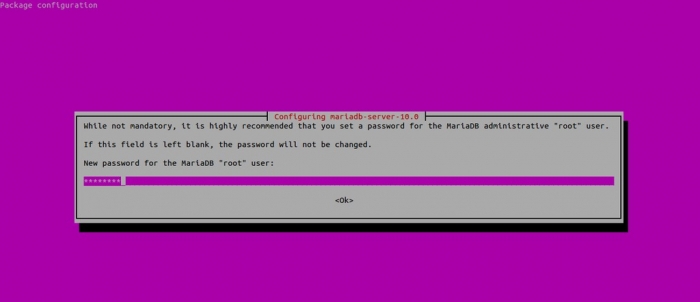
在安装中,你会被要求设置MariaDB的root密码。
从命令行连接到MariaDB :
  linuxtechi@mail:~$ mysql -uroot -p
  Enter password:
  Welcome to the MariaDB monitor. Commands end with ; or \g.
  Your MariaDB connection id is 40
  Server version: 10.0.14-MariaDB-1~trusty-log mariadb.org binary distribution
  Copyright (c) 2000, 2014, Oracle, SkySQL Ab and others.
  Type 'help;' or '\h' for help. Type '\c' to clear the current input statement.
  MariaDB [(none)]>
MariaDB 服务
  $ sudo /etc/init.d/mysql stop
  $ sudo /etc/init.d/mysql start
沃梦达教程
本文标题为:在Ubuntu系统中安装MariaDB数据库的教程


基础教程推荐








猜你喜欢
- 详解Redis连接命令使用方法 2024-03-23
- Redis GEORADIUS命令 2024-04-06
- 如何保障mysql和redis之间的数据一致性 2024-04-25
- Mysql查看死锁与解除死锁的深入讲解 2024-02-14
- mysql时间字段默认设置为当前时间实例代码 2022-08-31
- 浅谈数据库优化方案 2024-02-16
- mysql服务启动却连接不上的解决方法 2023-12-08
- SQL Server之SELECT INTO 和 INSERT INTO SELECT案例详解 2024-02-13
- Redis配置项汇总 2024-04-04
- MySQL索引优化之适合构建索引的几种情况详解 2023-12-29